
Plugin architecture lets a system grow beyond its initial requirements: the core defines stable extension points, and features arrive as plugins that add, swap, or drop behavior without touching it. Richards catalogs the style as microkernel — a minimal core whose features are all plugins.
The price sits in the contract: once third parties build against the API, the core team maintains a public product.
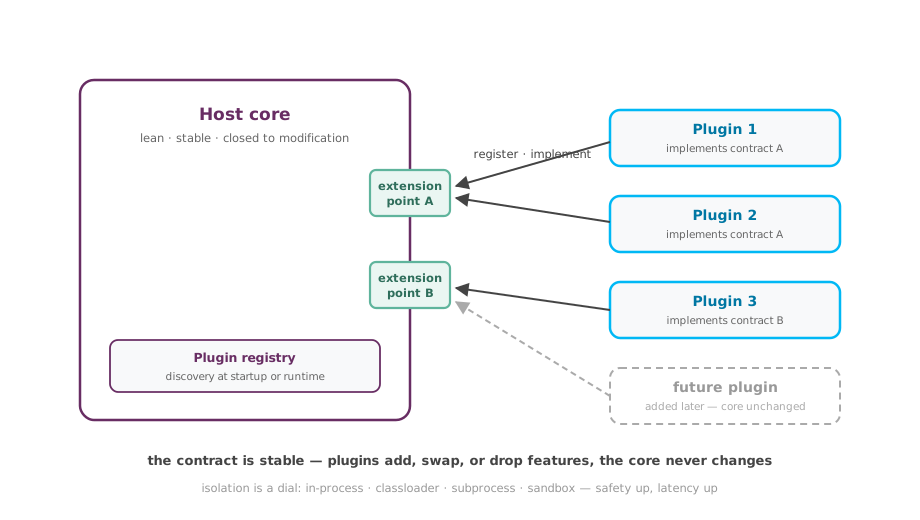
How It Works
- The core declares extension points — interfaces, abstract classes, event topics — and owns their semantics.
- Plugins implement a contract and register through discovery: directory scan, service registry (e.g. Java ServiceLoader, Python entry points), or runtime hot-plug.
- The host invokes extension points without knowing concrete types; one or all registered plugins answer.
- Isolation is a dial: in-process is fastest, classloader isolation prevents dependency conflicts, subprocess or sandbox contains crashes and malice — each step up costs latency.
Failure Modes
- A breaking API change strands the plugin ecosystem; core upgrades stall until plugins catch up.
- A plugin leaks memory, handles, or threads across unload cycles and slowly destabilizes the host.
- The host invokes an extension point before plugins finish registering; behavior varies silently with startup timing.
- An unsandboxed plugin runs with the host’s privileges; one compromised extension becomes a supply-chain incident.
Verification
- Every plugin passes the extension point’s shared compliance test suite before release.
- A chaos plugin that throws and hangs leaves the host and all other plugins serving.
- 100 consecutive load/unload cycles show flat memory and handle counts.
- Per-plugin p99 invocation time is tracked; one plugin adding over 10% to request latency triggers an alert.
Variants and Related Tactics
- Microkernel: the limiting case, where even built-in features are plugins — IDEs and module systems work this way.
- Extension hooks: named attachment points (before-save, after-login) — simpler and weaker than full contracts.
- Marketplace model: third-party plugins ship through a curated registry with automated quality and security gates.
- Sidecar moves the same extend-without-modifying idea out of process, to deployment time.
References
- Software Architecture Patterns, 2nd ed. — Mark Richards (O’Reilly, 2022), the Microkernel chapter
- Pattern-Oriented Software Architecture, Volume 1 — Frank Buschmann et al. (Wiley, 1996), the Microkernel pattern